Introduction
Misplacing everyday items is a common experience. Whether it’s a set of keys tucked into a jacket pocket, a wallet left in another room, or a backpack stored in an unexpected place, searching for frequently used belongings can be frustrating and time-consuming. Item trackers have become increasingly popular because they provide a simple way to help locate personal belongings through a compatible smartphone or tablet.
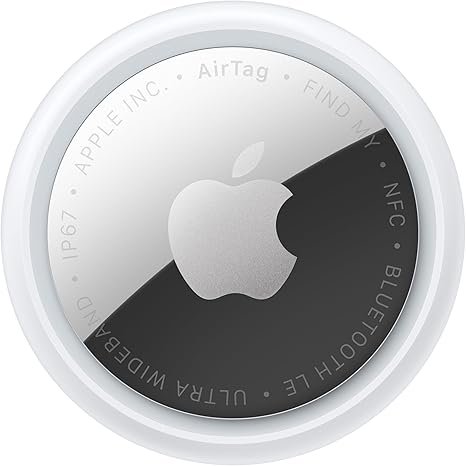
The Apple AirTag (2nd Generation) is designed to help users keep track of items such as keychains, wallets, bags, luggage, and other everyday belongings. Working with Apple’s Find My network and compatible iPhone or iPad devices, it offers features such as one-tap setup, sound playback to help locate nearby items, and enhanced Precision Finding capabilities for supported devices.
Rather than replacing careful organization, an item tracker can serve as an additional tool for locating misplaced belongings. Understanding how the technology works and where it fits into daily routines can help users determine whether it meets their needs.
This guide explores the key features of the Apple AirTag (2nd Generation), practical ways to use it, who may benefit from it, important considerations before choosing an item tracker, and answers to common questions.
What Is the Apple AirTag (2nd Generation)?
The Apple AirTag (2nd Generation) is a compact Bluetooth-enabled item tracker designed to help users locate compatible personal belongings through Apple’s Find My ecosystem.
Instead of functioning like a GPS tracker with its own cellular connection, AirTag works by communicating with nearby Apple devices participating in the Find My network. Depending on the situation and compatible hardware, users may be able to view the approximate location of an item, play a sound to locate it nearby, or use Precision Finding to help guide them toward the AirTag.
Because it is intended for locating personal belongings, it is commonly attached to or placed with frequently used items.
Key Features
One-Tap Setup
Setting up the AirTag is designed to be straightforward for compatible Apple devices.
After bringing the AirTag near a compatible iPhone or iPad, the setup process is intended to guide users through connecting the tracker to their Apple account.
This simplified setup can reduce the time needed before the AirTag is ready to use.
Precision Finding
One of the notable features of the AirTag (2nd Generation) is enhanced Precision Finding support on compatible devices.
Precision Finding is designed to provide more detailed directional guidance when the AirTag is nearby, helping users move toward its location with greater accuracy than standard Bluetooth proximity alone.
The advertised increase of up to 1.5 times the Precision Finding range refers to supported hardware and compatible conditions. Actual performance may vary depending on factors such as obstacles, wireless interference, and the surrounding environment.
Built-In Sound Locator
When an item is believed to be nearby but not immediately visible, users can trigger the AirTag to play a sound through the Find My app.
This feature may be useful when searching for items hidden under:
- Couch cushions
- Blankets
- Desk drawers
- Clothing
- Bags
- Vehicle seats
The sound provides an additional way to narrow down the location of nearby belongings.
Integration with the Find My Network
The AirTag works within Apple’s Find My network, which helps users locate compatible items using participating Apple devices.
When an AirTag is outside Bluetooth range of its owner, the Find My network may assist in updating its location if it comes within range of another participating Apple device.
This process is designed with privacy considerations in mind, and location information is encrypted.
Compact Design
The AirTag is small enough to be attached to a variety of everyday items using compatible accessories such as:
- Key rings
- Protective holders
- Luggage tags
- Bag attachments
- Wallet accessories
Because the AirTag itself does not include a built-in key ring hole, many users pair it with an accessory designed for their intended use.
Designed for Everyday Tracking
The AirTag is intended to help locate commonly misplaced personal belongings such as:
- Keys
- Wallets
- Handbags
- Backpacks
- Suitcases
- Camera bags
- Laptop bags
Its versatility makes it suitable for a variety of personal organization needs.
How It Can Be Used
Finding Lost Keys
Keys are among the most frequently misplaced household items.
Attaching an AirTag to a keychain can make it easier to locate keys through the Find My app or by playing a sound when they are nearby.
Keeping Track of a Wallet
Wallets often contain important identification and payment cards.
Using an AirTag with a compatible wallet accessory may help users locate a misplaced wallet within the home, office, or other everyday environments.
Travel and Luggage
Many travelers use item trackers with luggage to help identify the location of bags during trips.
While an AirTag is not a substitute for airline baggage tracking systems, it can provide additional information about the location of compatible tagged luggage through the Find My network.
Everyday Bags
Backpacks, briefcases, gym bags, and camera bags are frequently moved between locations.
Attaching an AirTag can make it easier to locate these items if they are accidentally left in another room or misplaced during daily routines.
Home Organization
Large households often have multiple people using similar items.
An AirTag can assist in locating personal belongings that become mixed with other household items.
Office Use
Professionals who carry work equipment between home and the office may use an AirTag with:
- Laptop bags
- Briefcases
- Equipment cases
This can provide additional peace of mind when managing frequently transported belongings.
Who It May Be Suitable For
The Apple AirTag (2nd Generation) may be suitable for a variety of users.
Apple Device Users
Because the AirTag is designed to work with Apple’s ecosystem, it is best suited to people who regularly use compatible iPhone or iPad devices.
Frequent Travelers
Travelers who regularly transport luggage may appreciate having an additional way to help locate checked or carry-on bags if they become separated from them.
Students
Students often carry backpacks, laptop bags, and other personal belongings between classrooms, libraries, and study areas.
An AirTag can help locate these items if they are misplaced.
Busy Professionals
Professionals managing multiple bags, keys, or equipment may find it useful to attach an AirTag to frequently carried belongings.
Families
Households with several family members may use AirTags to help identify personal items and reduce time spent searching for everyday essentials.
Important Things to Consider
Before choosing an AirTag, several practical considerations are worth keeping in mind.
Apple Ecosystem Compatibility
The AirTag is designed for use with compatible Apple devices.
Users of other smartphone platforms should verify compatibility before purchasing, as functionality is centered on Apple’s Find My system.
Accessories May Be Needed
The AirTag itself does not include a built-in attachment loop.
If you plan to attach it to keys, bags, or luggage, you may need a compatible holder, key ring, or accessory.
Intended Purpose
The AirTag is designed for locating personal belongings.
Users should follow applicable laws, platform guidelines, and privacy expectations regarding its use.
Battery Maintenance
Like many compact trackers, the AirTag operates using a replaceable battery.
Checking battery status periodically through the Find My app can help ensure the tracker remains ready for use.
Environmental Factors
Features such as Bluetooth communication, Precision Finding, and network-assisted locating may vary depending on:
- Device compatibility
- Physical obstacles
- Wireless interference
- Distance
- Availability of nearby participating Apple devices
Understanding these factors helps establish realistic expectations.
Comparing General Item Tracker Categories
Different types of item trackers serve different needs.
| Feature | Bluetooth Item Tracker | GPS Tracker | Basic Label Tag |
|---|---|---|---|
| Helps Locate Misplaced Items | Yes | Yes | No |
| Smartphone Integration | Yes | Often | No |
| Nearby Sound Feature | Often | Varies | No |
| Ongoing Cellular Service | Usually No | Often Required | No |
| Everyday Carry Convenience | Excellent | Moderate | Excellent |
Bluetooth-based trackers are generally intended for locating personal belongings within supported ecosystems, while GPS trackers are commonly used for applications requiring broader location tracking and may involve additional service requirements.
Tips for Getting the Most from Your AirTag
To help maximize everyday usefulness:
- Attach the AirTag securely using a compatible accessory.
- Name each AirTag clearly within the Find My app.
- Check the battery status periodically.
- Keep your Apple device updated with current software.
- Test the sound feature occasionally so you are familiar with how it works.
- Store important belongings in consistent locations whenever possible to complement tracking features.
Frequently Asked Questions
Does the AirTag include a built-in key ring?
No. The AirTag itself is a compact circular tracker and typically requires a compatible accessory if you want to attach it to keys, bags, or similar items.
Can it help find nearby items?
Yes. If the AirTag is within range, users can play a sound through the Find My app to help locate the item nearby.
What is Precision Finding?
Precision Finding is designed to provide more detailed directional guidance on compatible Apple devices, helping users move toward the location of a nearby AirTag.
Can it be used with luggage?
Many travelers attach AirTags to luggage as an additional way to help locate their bags. It is intended to complement—not replace—airline baggage services.
Does it require charging?
No. The AirTag uses a replaceable battery rather than a rechargeable one, so there is no charging cable required for everyday use.
Does it work with every smartphone?
The AirTag is designed primarily for compatible Apple devices that support the Find My ecosystem. Users should confirm compatibility before purchasing.
Can multiple AirTags be used together?
Yes. Many users attach separate AirTags to different personal belongings such as keys, bags, wallets, and luggage, allowing each item to be managed individually within the Find My app.
Conclusion
The Apple AirTag (2nd Generation) is designed to make it easier to locate everyday belongings such as keys, wallets, backpacks, luggage, and other frequently carried items. With features including one-tap setup on compatible iPhone or iPad devices, sound playback for nearby searches, integration with Apple’s Find My network, and enhanced Precision Finding support on compatible hardware, it offers a practical approach to keeping track of personal possessions.
Rather than replacing good organizational habits, an item tracker can provide an additional layer of convenience when items are misplaced during daily routines or travel. Its compact size and compatibility with a variety of accessories make it adaptable to different storage and carrying needs.
As with any tracking accessory, the most suitable choice depends on your devices, how you plan to use it, and the items you want to monitor. Considering compatibility, intended use, and available accessories can help you decide whether the Apple AirTag (2nd Generation) fits your everyday organization needs.